Cat Alert: Home Assistant Announces an Open Door
Someone left the front door open. Not wide open, not for long — just open. Long enough that both cats walked out of it. Alfie and Shaniqua are indoor cats; they have a catio and that is the whole extent of their outdoor career.
Nothing happened. We got them back, unhurt. But standing in the driveway at night calling a black long-hair who has decided hedges are interesting now is an effective way to start thinking about automations. A house full of sensors, and not one of them says the door is open.
The requirement was small: when a door stays open, the house should say something out loud. Not a push notification on a phone in another room.
The first plan: make the Ring base station talk
As far back as I can remember, I wanted the house to say things. And I already own a device that does exactly that: the Ring Alarm* base station in the hallway has a speaker, speaks German and English, and announces “entry delay” at me several times a week.
So I went looking for the endpoint. There isn’t one.
Ring’s API — and ring-mqtt on top of it — exposes the base station’s volume
and the burglar siren. That’s it. The spoken prompts are fixed firmware
sounds. No TTS, no “play this string.” I own the hardware, it has a speaker, it
forms sentences, and I cannot make it say one sentence of mine.
Second idea, smaller: don’t make it talk, make it chirp — that “ding dong”
when a door opens. Also impossible. The chirp is generated by the base station as
a reaction to a sensor event. Home Assistant can configure which tone plays —
select.front_door_chirp_tone, Ding Dong through Xylophone — but it cannot
trigger one. And that select read “Disabled,” unchanged since a ring-mqtt
restart.
Nothing else in the Ring inventory works either. switch.pasching_alarm_siren
is the burglar siren and would terrify the cats more than the open door does,
switch.entrance_hall_keypad_chirps is a setting toggle rather than an
on-demand beep, switch.kitchen_siren is a camera siren — a tone, not speech —
and number.pasching_base_station_volume isn’t a sound source at all.
So the announcers ended up being two devices never meant to be alarm hardware: the living room TV (a Chromecast) and the wall tablet (a Lenovo P11 running the HA Companion app).
The entity with the obvious name is the wrong entity
First, the bug that cost me an evening.
The front door has binary_sensor.front_door. Friendly name “Front Door”. I used
it. Of course I used it.
binary_sensor.front_door is the front door camera’s motion sensor.
device_class: motion. It is not the door. The actual door contact is
binary_sensor.contact_sensor_32232 — device_class: door, a contact sensor
from the Ring alarm. The entity with the obvious name is the wrong one; the one
named after a serial number is right.
The nasty part is that the wrong version still works. Nothing errors, nothing
logs a warning, the automation fires happily — at the mailman, at a passing car,
at me taking out the trash. What surfaced it was an older, dumber automation:
automation.living_room_double_door_open_10s_rene_iphone, the plain 10-second
push about the double door. It kept firing correctly while the cat alert didn’t.
That mismatch is what finally made me look at device_class. The second door,
binary_sensor.double_door_living_room, came later.
The automation
This is what runs here, automation.front_door_left_open_announce_on_tv:
alias: "Door left open – announce"
triggers:
  - trigger: state
    entity_id:
      - binary_sensor.contact_sensor_32232
      - binary_sensor.double_door_living_room
    to: "on"
    for: "00:00:30"
conditions:
  - condition: state
    entity_id: timer.cat_alert_snooze
    state: idle
variables:
  door: "{{ trigger.entity_id }}"
  message: "Cat alert! A door is open. Cat alert! A door is open. Cat alert! A door is open."
mode: parallel
max: 2
actions:
  - action: scene.create
    data:
      scene_id: cat_alert_before
      snapshot_entities:
        - light.wohnzimmer_lampe
        - media_player.renes_echo_spot
    continue_on_error: true
  - action: notify.mobile_app_hatablet
    data:
      message: command_screen_on
    continue_on_error: true
  - action: notify.mobile_app_hatablet
    data:
      message: command_webview
      data:
        command: /dashboard-dashboard/cat-alert
    continue_on_error: true
  - action: notify.mobile_app_hatablet
    data:
      message: command_volume_level
      data:
        media_stream: alarm_stream
        command: 10
    continue_on_error: true
  - action: media_player.volume_set
    target:
      entity_id: media_player.renes_echo_spot
    data:
      volume_level: 0.6
    continue_on_error: true
  - repeat:
      while:
        - condition: template
          value_template: "{{ is_state(door, 'on') }}"
        - condition: state
          entity_id: timer.cat_alert_snooze
          state: idle
      sequence:
        - parallel:
            - repeat:
                count: 3
                sequence:
                  - action: light.turn_on
                    target:
                      entity_id: light.wohnzimmer_lampe
                    data:
                      brightness_pct: 100
                    continue_on_error: true
                  - delay: { milliseconds: 600 }
                  - action: light.turn_off
                    target:
                      entity_id: light.wohnzimmer_lampe
                    continue_on_error: true
                  - delay: { milliseconds: 600 }
            - sequence:
                - action: notify.mobile_app_hatablet
                  data:
                    message: TTS
                    data:
                      tts_text: "{{ message }}"
                      media_stream: alarm_stream
                - if:
                    - condition: state
                      entity_id: media_player.living_room_tv
                      state: "off"
                  then:
                    - action: media_player.turn_on
                      target:
                        entity_id: media_player.living_room_tv
                      continue_on_error: true
                    - wait_template: "{{ not is_state('media_player.living_room_tv','off') }}"
                      timeout: "00:00:25"
                      continue_on_timeout: true
                - action: tts.speak
                  target:
                    entity_id: tts.google_translate_en_com
                  data:
                    media_player_entity_id: media_player.living_room_tv
                    message: "{{ message }}"
                  continue_on_error: true
            - action: notify.alexa_media
              data:
                message: "{{ message }}"
                target:
                  - media_player.renes_echo_spot
                data:
                  type: announce
              continue_on_error: true
        - wait_template: "{{ is_state(door,'off') or not is_state('timer.cat_alert_snooze','idle') }}"
          timeout: "00:00:20"
          continue_on_timeout: true
  - action: scene.turn_on
    target:
      entity_id: scene.cat_alert_before
    continue_on_error: true
Every service action carries continue_on_error: true. Tablet offline, the Echo
and the TV still announce. Chromecast unplugged, the other two still announce.
The Echo arrived last — and does the job best
All the machinery above exists because there was nothing in the living room that
could simply talk. Now there is: media_player.renes_echo_spot, an Echo Spot
that runs as a voice assistant anyway — its live last_called_summary says my
last sentence to it was “wohnzimmer licht aus.”
The hookup is one branch in the parallel: block: notify.alexa_media with
target: [media_player.renes_echo_spot] and data: { type: announce } — Alexa’s
announcement mode, so a chime and then the spoken text. No waking up, no
wait_template, no Chromecast that needs a moment to collect itself. It’s in the
room and it says the sentence. I have not measured that branch; the only real
numbers here remain about 1 second for the tablet and about 17 seconds for
a cold Chromecast.
Alongside it, media_player.volume_set to 0.6, so the announcement doesn’t play
at whatever level somebody left it at (previous_volume here: 0.1). That same
volume goes into the snapshot scene and gets put back afterward.
Three limitations, unvarnished.
One: scene.cat_alert_before doesn’t exist as an entity yet. scene.create
makes it at runtime, and the rename is newer than the last run — so the restore
only works from the second run of the new config onward, and the first alert after
an HA restart has nothing to restore.
Two: Alexa Media Player is a HACS integration riding a logged-in Amazon cloud session. It works today, verified, and it will stop working the day Amazon changes something about login or 2FA.
Three: nobody has yet stood in the living room during an alert with all three announcers going at once. Whether that sounds clean or like three drunks reciting the same sentence, I don’t know.
The punchline: an Amazon speaker says any sentence I want, on request. The Ring base station in the same house — also Amazon, also with a speaker, also capable of speech — only says the sentences somebody else planned.
Why the crooked constructs
wait_template instead of wait_for_trigger for the TV. The Chromecast often
flips off → idle while media_player.turn_on is still running. A
wait_for_trigger armed after that call misses the transition and burns the entire
timeout. A template is evaluated immediately and is already true. Measured: about
25 seconds before, about 5 after.
wait_template instead of a fixed delay in the loop, because the first version
slept a fixed amount and then yelled again with the door long since shut — as a
template on door, because which door it is changes per run. And all three
announcers in parallel rather than in sequence, or the fast announcement waits on
the slowest.
The Android half took longer than the automation
The tablet stayed silent. Not “played quietly” — silent.
HA traces settled the blame quickly: Home Assistant handed off all four tablet commands within 1 second of the trigger, twice in a row (08:46:52.7 and again 20 seconds later). The failure was entirely Android’s. The cause was Doze, which defers Firebase push during deep sleep. The giveaway: silence, and then the moment I unlocked the tablet, all the queued announcements fired at once.
The settings that mattered, in the order they bit me:
- Display over other apps — required by
command_screen_onandcommand_launch_app. - Lock screen set to None. With a PIN the app can’t come up over the lock screen. Swipe isn’t enough either.
- Notification policy / Do Not Disturb access — required by
command_volume_level. On Android 15 this got renamed to “Modes access”, which is why the tablet displayed a settings screen nobody recognized. - Battery → Unrestricted / “Allow background usage.” Worded differently on Lenovo’s ZUI flavor and genuinely hard to find. Also not the problem here — it had been on the whole time.
- Persistent connection → Always (HA app → Settings → Companion app →
Notifications). The actual fix. HA then delivers over a local websocket
instead of Firebase, and Doze can’t hold anything back. Costs a permanent
foreground-service notification. Worth it, and settable remotely with
command_persistent_connection: always, alongsidekeep_screen_on. It only exists in the Play Store build; the F-Droid build has no Firebase and uses the websocket anyway.
On volume: alarm_stream_max forces maximum without a permission and restores your
old level afterward. Plain alarm_stream plays at whatever level you set first and
needs the DND permission. I landed on 10 of 15.
The snooze you can’t forget
Leave the terrace door open on a summer evening and you do not want to be yelled at
every 20 seconds. That’s timer.cat_alert_snooze: 30 minutes, restore: true, so
it survives an HA restart. It’s checked as a condition at the top (never start) and
inside the while (stop mid-nag, within 20 seconds at worst). Then it expires and
everything is armed again.
It’s a timer and not an input_boolean on purpose. A switch you can turn off is
a switch you forget to turn back on, and then the door stands open while the warning
is muted. Same instinct as the
catio shutter safety interlock: the protection
must not depend on me remembering it. On the dashboard it sits under “Doors” and in
the Cat Alert view — idle, “Snooze Cat Alert (30 min)”; running, “Cat Alert snoozed
– tap to resume” with the remaining time.
The Cat Alert view
/dashboard-dashboard/cat-alert, built as a subview so it doesn’t clutter the
tab bar. On it: the heading “Cat alert! A door is open”, a picture of Alfie and
Shaniqua, a color-coded status list for both doors, the snooze/resume button and a
way back to the main dashboard. command_webview pushes the tablet straight onto
it — look at it and you know which door is the problem.
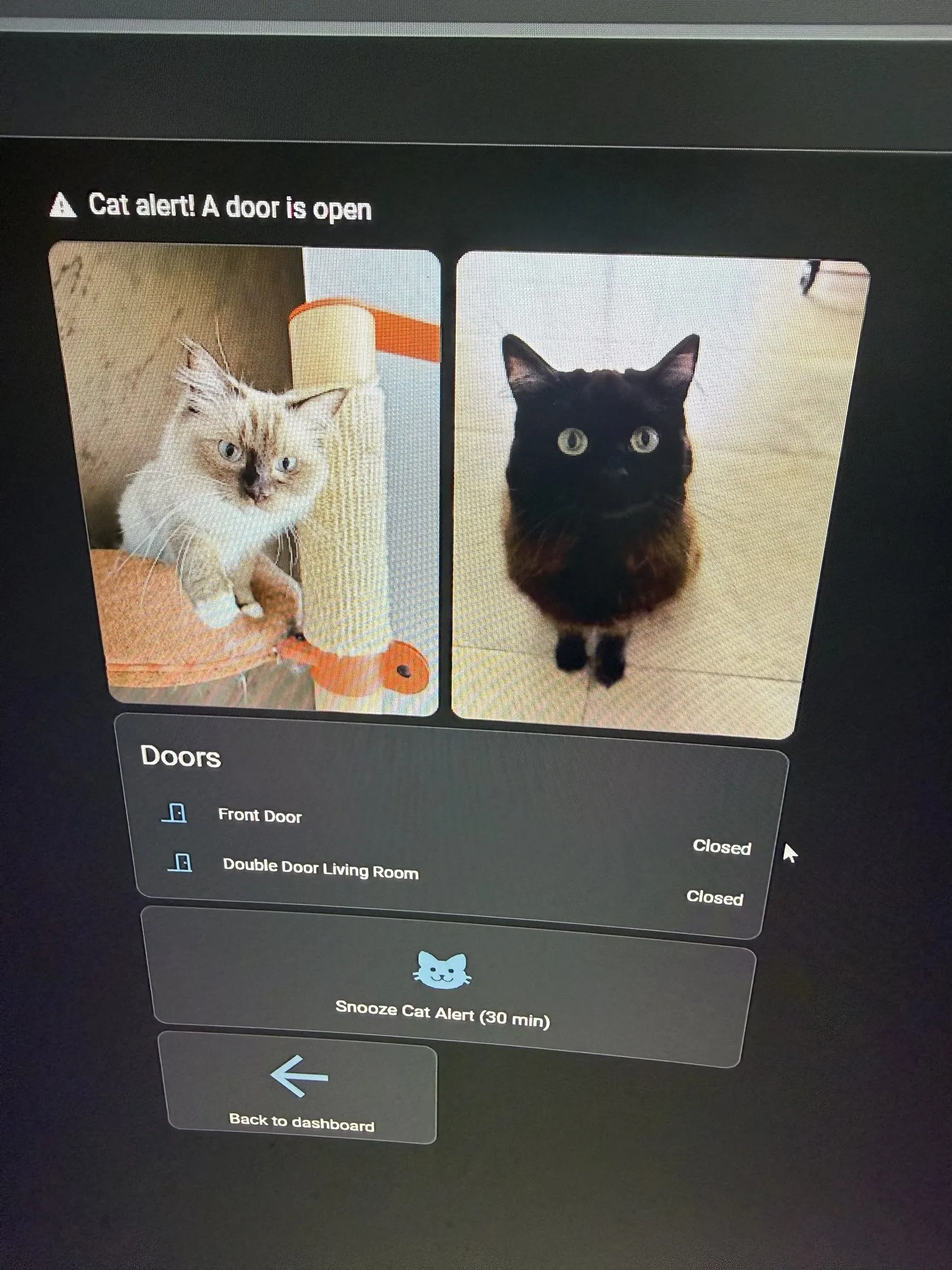
The cat photos don’t live on the HA host; they come from this blog’s hashed
_astro/… URLs. Known breaking point: new hashes, pictures gone.
Honestly:
This is a nag machine, not a safety device. It announces after the fact, and a
cat is out the door long before the 30 seconds are up. Those 30 seconds are a
compromise: shorter and it screams every time I carry in groceries, longer and the
cat is gone. Two doors are covered; every other door and every window are not.
Not tested: what happens when both doors are open at the same time. mode: parallel with max: 2 is in there for exactly that, but the case has never
actually occurred. I’m not claiming it works — only that I planned for it.
And the part I would have written differently a few weeks ago: if you have a proper voice speaker, start there. The Echo branch is a handful of lines of YAML. The tablet branch cost me five Android settings and more time than the entire automation, and a consumer tablet having to stay awake is the weakest link in the chain.
What the Echo does not solve: it hangs off an Amazon session I don’t control, and the day that session tips over is precisely the day the annoying tablet is the reason somebody still closes the door. And it only talks in one room; the lamp and the TV are there because an announcement sometimes goes unheard. So the old machinery doesn’t get ripped out — it went from lead actor to understudy.
Where I landed
With an automation that does not save my cats. It says a sentence, blinks a lamp and stops as soon as the door is shut. It runs on a door contact named after a serial number, speaks through a TV that was not built for it, through a tablet I had to break of its sleeping habit — and, recently, through the one device in the setup that was actually built for this. In the hallway next door stands the alarm system from the same corporation, still allowed to contribute nothing. Since this thing has been running, no door has stood open for a minute without somebody noticing.